Appinio includes a commenting feature that supports collaboration during survey creation. Comments are added at the individual question level and are visible to all collaborators on the survey.
Adding a Comment
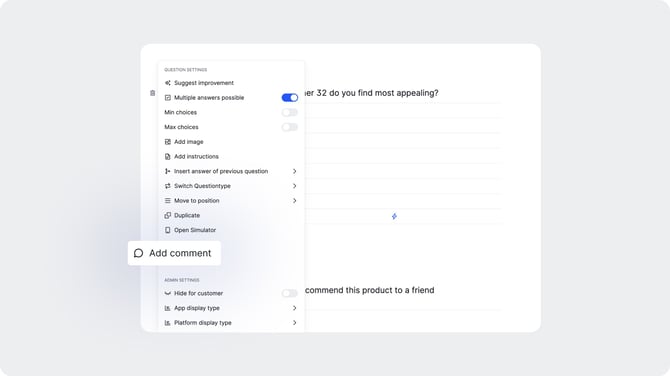
To leave a comment on a question, open the question settings and select "Add Comment."
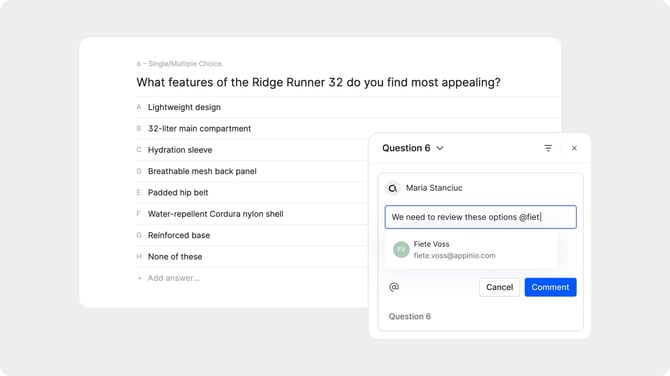
Type your comment in the field that appears. You can tag collaborators by typing "@" followed by their name. This sends a notification to the tagged person, making it easy to flag specific questions for review, ask for feedback, or communicate directly with the Appinio research team.
Viewing Comments
All comments are collected in the comment panel, accessible from the menu on the right-hand side of the survey editor. The panel gives you a consolidated view of all comments across the survey, so you can review feedback without having to open each question individually.
Managing Comments
From the comment panel you can:
- Filter comments to narrow down the view by status or type.
- Reply to comments to continue a conversation thread directly within the panel.
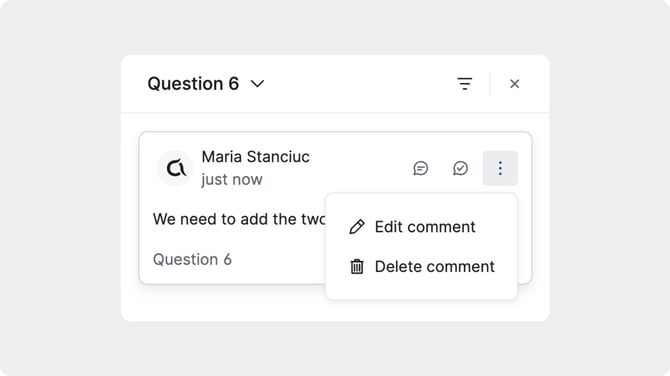
- Resolve comments to mark them as addressed once the feedback has been actioned. Resolved comments can be toggled on or off in the panel view.
- Edit a comment by clicking the three-dot menu next to it and selecting "Edit comment."
- Delete a comment by clicking the three-dot menu next to it and selecting "Delete comment."