
After completing your questionnaire, the next step is to define who should participate in your survey. Click "Configure" at the top of the questionnaire to proceed.
Basic Settings
- Survey name sets the title of your survey as it will appear in your projects page.
- Number of participants sets how many respondents you want to collect. Participant counts can only be selected in increments of 100. If you need a different number, you can request an adjustment after submitting your survey for review.
- Country sets the country where your respondents should be located.
- Age range sets the minimum and maximum age of respondents.
- Gender lets you select "Male", "Female", or "All Genders." Selecting "All Genders" includes non-binary respondents in the study.
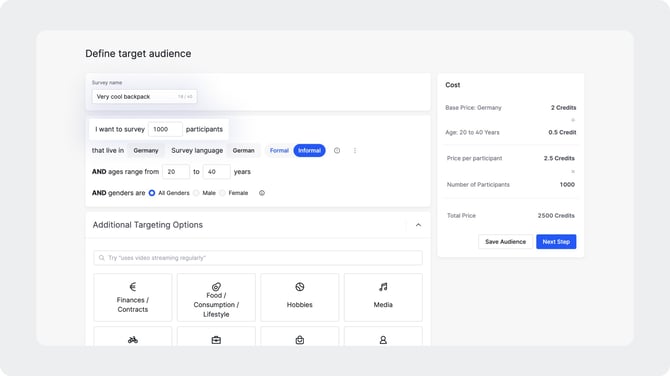
Additional Targeting Options
Beyond basic demographics, you can narrow your audience using a range of targeting criteria organized into the following categories:
- Finances and Contracts
- Food, Consumption and Lifestyle
- Hobbies
- Media
- Mobility
- Profession and Work
- Shopping
- Socio-demographics
- Other
Use the search bar at the top of the targeting options panel to find specific criteria quickly.
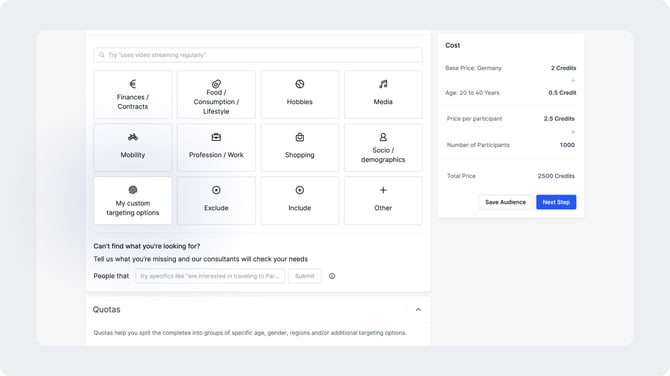
Can't Find What You Need?
If the targeting criteria you need are not listed, use the free-text field to describe your requirements. Your Appinio research consultant will review the request and confirm whether it can be accommodated.
Estimated Cost
As you configure your audience, an estimated cost in survey credits is displayed on the right-hand side of the screen. Note that this is an initial estimate and the final credit calculation may differ.