
If you have already drafted your survey in another tool, you can bring it into Appinio directly using the Import Questionnaire feature. This saves you from having to rebuild your questionnaire from scratch and lets you move from concept to fieldwork faster.
You can import questionnaires from the following file types: .doc, .xls, .ppt, and .pdf.
How to Import a Questionnaire
- Open your survey in the survey editor.
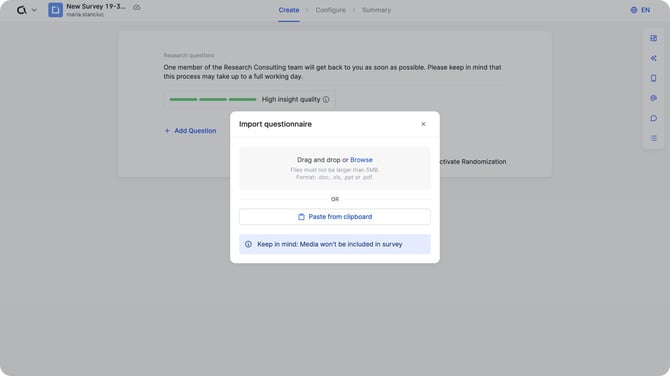
- Click the "Import Questionnaire" button next to the "+ Add Question" button.

- Upload your file using one of the following methods:
- Drag and drop your file into the upload area.
- Click "Browse" to locate and select the file from your device.
- Paste content directly from your clipboard if you have copied it from another source.
- Appinio AI will read the uploaded content and map it to the appropriate question types automatically.
- Review the imported questions to make sure they have been mapped correctly and edit them as needed.
Things to Keep in Mind
- Review all imported questions carefully before submitting your survey. While Appinio AI does its best to interpret your content accurately, complex formatting or unconventional question structures may require manual adjustments.
- Images and media included in your source file are not imported automatically. You will need to add these separately using the Add Media feature. For more details, refer to the Survey Interface article.
- Filters and logic set up in your original file will not be carried over. You will need to configure these manually in the survey editor after importing. For guidance, refer to the Using the Filter Function article.